

A logo generator gives you an asset. A brand generator gives you a system. If you only need a mark, a dedicated AI logo generator can be enough. If you are launching a company that also needs colors, typography, a website and social assets, an AI brand generator is the more relevant category.
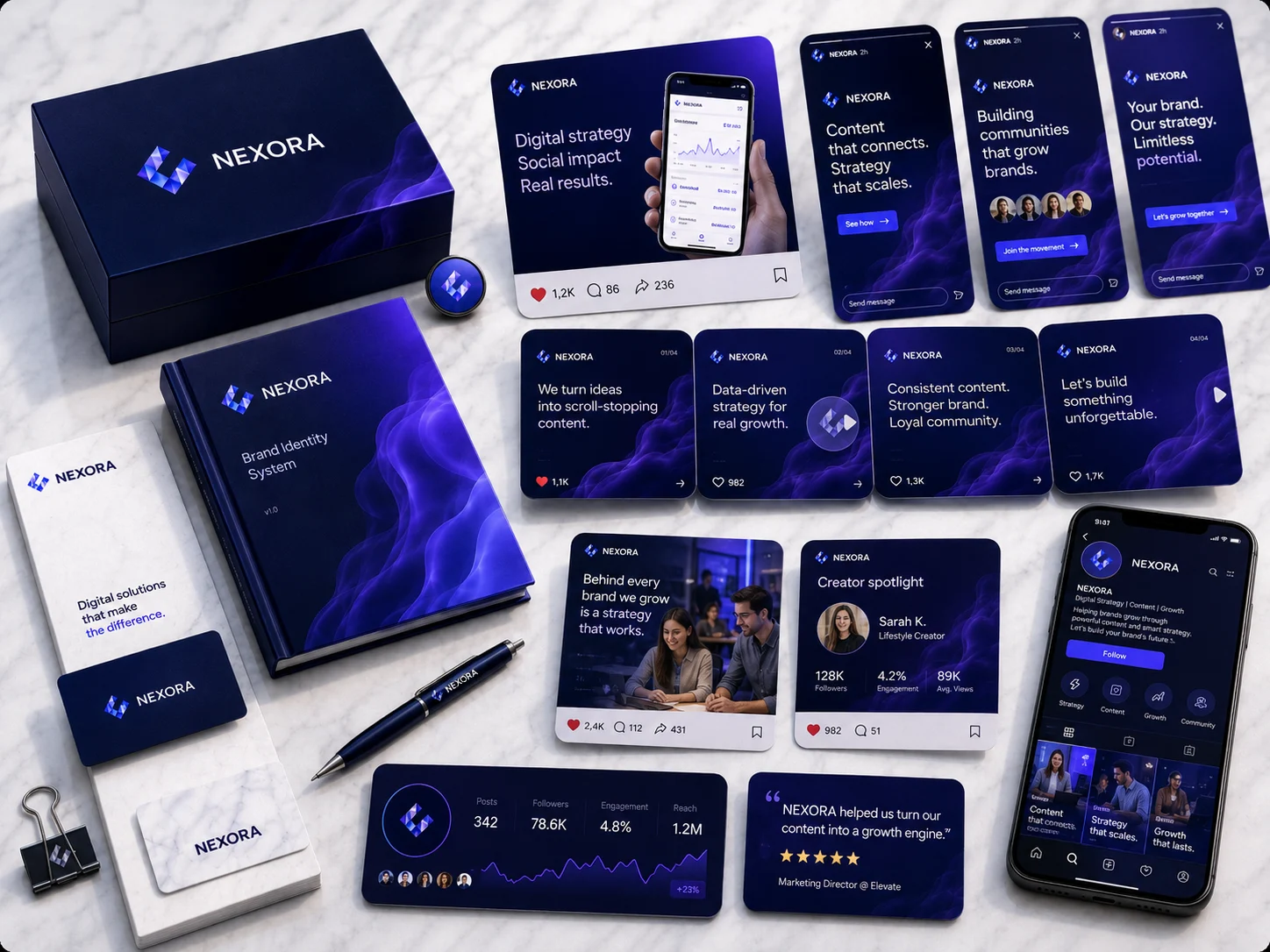
Table of Contents
AI Logo Generator vs AI Brand Generator: What's the Difference?
AI can generate a logo in seconds. But is a logo what you actually need?
For many founders, freelancers and small businesses, the answer becomes obvious a few days after downloading their first AI-generated logo.
You have the logo. Now you need colors. Then fonts. Then an Instagram post. Then a landing page. Then a presentation. Then business cards. Then a banner.
Suddenly, the simple task of “making a logo” has turned into a much larger project: building a brand.
That is where the difference between an AI logo generator and an AI brand generator becomes important.
An AI logo generator primarily solves one problem: creating a logo.
An AI brand generator attempts to create a connected identity system around the business. That may include logos, color palettes, typography, moodboards, brand guidelines, website design, copy and marketing visuals.
Platforms such as Brandolia belong to this broader category. Brandolia currently combines a Brand Identity Studio, Website Builder and Marketing Visual Generator, with outputs spanning logos, typography, palettes, brand books, social media graphics and websites.
So which type of tool should you choose? This guide breaks down the differences in detail.
AI Logo Generator vs AI Brand Generator: Quick Comparison
| Feature | AI Logo Generator | AI Brand Generator |
|---|---|---|
| Logo concepts | Yes | Yes |
| Logo variations | Often | Yes |
| Logo editing | Often | Often |
| Color palette | Basic / optional | Core feature |
| Typography system | Sometimes | Yes |
| Moodboard | Usually not | Often |
| Art direction | No | Yes |
| Brand guidelines | Limited | Yes |
| Slogan / messaging | Sometimes | Often |
| Website creation | Usually not | Depending on platform |
| Website copy | No | Depending on platform |
| Social media visuals | Templates or exports | Integrated |
| Ads / banners | No or limited | Often |
| Shared visual consistency | Limited | Primary goal |
| Best for | A quick logo | A complete business launch |
What Is an AI Logo Generator?
An AI logo generator uses algorithms or generative models to create logo concepts based on information you provide.
Typical inputs include company name, industry, preferred style, colors, icons, keywords and sometimes a slogan. The tool then produces variations for you to select and customize.
For someone who needs a quick visual identifier, this can be extremely useful. A local event, side project, YouTube channel, internal project or prototype may not need a complete brand strategy. A logo can be enough.
That is the strongest use case for dedicated AI logo generators: speed and simplicity.
What Is an AI Brand Generator?
An AI brand generator starts from a broader question.
Instead of asking only “What should the logo look like?”, it attempts to answer “What should this business look and feel like everywhere?”
A complete brand identity may include the primary logo, logo alternatives, icon or symbol, color palette, typography, slogan, tone of voice, moodboard, art direction, graphic elements, brand guidelines, website, advertising visuals, social content and print assets.
Brandolia's public product description, for example, includes logo variations, color palettes, typography, moodboards, custom visual elements, brand guidelines, AI website creation and marketing visual generation.
The goal is therefore not simply output volume. It is cohesion.
If you are still mapping the full process, start with how to build a brand with AI.
Why the Difference Matters
Imagine launching a coffee brand called North Peak Coffee.
You use an AI logo maker and receive a sophisticated black mountain symbol. Great.
Then you open another design tool and choose orange and beige for your Instagram templates. You build your website from a bright blue technology template. You ask a general-purpose AI writer for homepage copy, and it uses a playful tone filled with emojis.
None of these individual decisions is necessarily bad. Together, however, they do not describe the same brand.
This is the hidden cost of fragmented creative workflows. The tools work. The system does not.
An AI brand generator attempts to establish the system before producing the individual pieces.
Difference #1: Logo Creation vs Identity Creation
A logo is an identifier. A visual identity is a language.
This distinction matters because customers rarely experience your logo in isolation. They see it inside a website header, on packaging, on LinkedIn, inside an advertisement, next to specific typography, against specific colors.
When all those elements reinforce one another, the business feels intentional. When they do not, the business can feel less established—even if the customer cannot explain exactly why.
A brand generator therefore expands the design problem from “make a good logo” to “make multiple brand touchpoints feel related.”
Difference #2: Color Palette
Many logo makers allow you to change logo colors. That is not necessarily the same thing as creating a color system.
A brand palette needs roles:
| Role | Example |
|---|---|
| Primary | Deep navy |
| Secondary | Soft blue |
| Accent | Electric lime |
| Background | Off-white |
| Text | Near-black |
| Muted neutral | Gray |
The question is not simply whether colors look attractive together. You need to know where to use them. Your primary color may dominate your website navigation. Your accent may be reserved for conversion buttons. Your neutral palette may support long-form content.
A brand generator should give you a more complete starting system.
Difference #3: Typography
A logo generator may include a font inside the logo. That does not necessarily tell you what font to use for website headings, paragraph text, presentations, social posts, proposals, pricing tables or email graphics.
Typography strongly affects perceived personality. A geometric sans serif can feel modern. A high-contrast serif can feel editorial or premium. A rounded typeface can feel approachable.
The role of an identity system is to make these choices deliberate rather than accidental.
Difference #4: Brand Guidelines
This is one of the clearest differences.
A logo file tells you what your logo looks like. A brand guide tells you how your identity should behave.
Useful guidelines can include approved logos, minimum sizes, spacing, background usage, color values, font hierarchy, image style, visual examples, tone of voice and design principles.
Brandolia currently describes its workflow as producing a complete brand kit and brand guidelines alongside identity assets.
For a solo founder, guidelines may initially feel unnecessary. Then you hire a freelancer. Or create 50 social posts. Or redesign your website six months later. At that point, the guide becomes extremely valuable.
Difference #5: Moodboards and Art Direction
Most logo generators focus on the logo itself. A broader branding system also needs to answer what exists around the logo.
Should photography be cinematic, bright and natural, minimal, high contrast, editorial, retro or futuristic? Should graphics use gradients, organic shapes, technical diagrams or hand-drawn elements?
A moodboard creates that wider visual world. Brandolia currently includes moodboards and art-direction generation as part of its identity workflow.
This matters particularly for AI-generated marketing content because generative models can otherwise drift rapidly between styles.
Difference #6: Website Creation
Here the categories separate dramatically.
Most AI logo generators stop once the identity asset has been produced. You may receive PNG or SVG files and then move to another platform to create your website.
An integrated AI branding platform can continue the workflow. Brandolia's Website Builder currently generates pages, sections and website copy within the platform and supports responsive output and HTML export.
This can reduce a common problem: designing the brand twice. Once in the logo tool. Again in the website builder.
Difference #7: Marketing Asset Creation
A business does not launch once. It communicates repeatedly.
That means producing social posts, campaign graphics, display ads, flyers, business cards, banners, mockups and promotional material.
Brandolia's Marketing Visual Generator currently covers social posts, ads, banners, flyers, business cards and mockups.
An integrated branding platform has an important advantage here: the creative system already knows what the brand is supposed to look like.
AI Logo Maker vs Brand Generator: Workflow Comparison
Consider a founder launching a new consulting company.
Workflow with separate tools
Logo generator → download logo. Palette website → choose colors. Font website → choose fonts. Document → manually write brand guidelines. Website builder → recreate styles. AI writer → generate copy. Design platform → recreate styles again. Social templates → adjust everything manually.
Workflow with an integrated AI brand platform
Brand brief → identity → art direction → brand guidelines → website → marketing assets.
The first workflow gives you maximum freedom. The second aims to reduce duplication. Neither is automatically superior. They optimize for different priorities.
AI Logo Generator Advantages
Standalone logo generators still make excellent sense in many situations.
- They are fast. You can frequently generate concepts almost immediately.
- They are focused. If you only need a logo, the interface does not need to expose dozens of unrelated features.
- They can be inexpensive. Simple logo tools often have free previews or low-cost downloads.
- They are useful for exploration. You can use them to explore symbols, compositions or broad directions before commissioning custom work.
- They require fewer decisions. That is useful when your project does not justify a full identity system.
AI Logo Generator Limitations
The main limitation is scope. You may leave with a good logo and still need to answer: What colors do we use on the website? What fonts should we use? What does an Instagram post look like? What style should our images use? How should the landing page look? What should advertisements look like?
If you solve those questions independently, visual drift becomes more likely.
AI Brand Generator Advantages
- Consistency — Connected outputs reduce the risk that every asset looks like it came from a different designer.
- Faster launch — Identity, website and marketing assets can be developed without restarting the creative process repeatedly.
- Fewer tools — A smaller software stack means less exporting, importing and recreating.
- Better starting point for non-designers — You are not required to invent an entire identity system manually.
- Easier scaling — Once guidelines exist, new visuals can be evaluated against a defined standard.
AI Brand Generator Limitations
The broader scope can also introduce trade-offs. A specialized website platform may provide much deeper website functionality. A specialist design application may provide more detailed editing. A professional branding agency may deliver deeper strategic research. An enterprise design system may require governance far beyond the needs of a small-business AI platform.
The question is therefore not “What tool has the largest feature list?” The better question is “What level of system do I need at my current stage?”
Brandolia vs a Traditional AI Logo Generator
| Need | Typical AI logo generator | Brandolia |
|---|---|---|
| Logo generation | Yes | Yes |
| Logo variations | Yes | Yes |
| Logo editing | Usually | Yes |
| Color palette | Basic / varies | Yes |
| Typography | Varies | Yes |
| Slogan | Varies | Yes |
| Moodboard | Usually no | Yes |
| Art direction | Usually no | Yes |
| Graphic elements | Rare | Yes |
| Brand guidelines | Limited | Yes |
| Website | Usually no | Yes |
| Website copy | Usually no | Yes |
| Social visuals | Limited | Yes |
| Ads / banners | Limited | Yes |
| Business cards / mockups | Varies | Yes |
This table reflects Brandolia's currently published capabilities; individual logo generators vary significantly.
The value proposition is straightforward: Brandolia is intended to continue where a logo generator normally stops.
What About Canva?
Canva occupies a somewhat different category. It is far more than a logo maker.
Canva provides a broad visual communication platform and its Brand Kit can centralize logos, colors, fonts, imagery, templates and guidelines. Canva also uses this brand information in AI-assisted design workflows.
For teams that already know what their brand is and need to create a high volume of content, Canva is extremely powerful.
Brandolia approaches the problem from another direction: start with the business idea and generate the identity itself, then extend it into a site and marketing visuals.
Canva can be viewed primarily as a creation environment with brand-management functionality. Brandolia is positioned primarily as an AI brand creation workflow.
For a full three-way comparison, see Canva + Wix alternative.
What About Wix?
Wix is particularly strong when the website itself is the center of the project. Its platform offers an AI website builder, templates, hosting, business tools, SEO tools and advanced website functionality. Wix also provides logo and brand functionality through its Logo Maker and Brand Studio.
Again, the difference is one of starting point. Wix is fundamentally a sophisticated web platform that has expanded into AI and brand tools. Brandolia starts with brand creation and extends the identity into the website and marketing.
For a complex e-commerce store, membership platform or sophisticated business website, Wix's depth can be a major advantage. For a solopreneur who wants to go from an idea to a coordinated identity, landing site and social assets quickly, Brandolia's workflow may be simpler.
Logo Generator vs Brand Generator vs Designer
| Option | Speed | Cost | Strategy depth | Customization | Full system |
|---|---|---|---|---|---|
| AI logo generator | Very fast | Low | Low | Medium | Low |
| AI brand generator | Fast | Low–medium | Medium | Medium | High |
| Freelance designer | Medium | Medium–high | Medium–high | High | High |
| Branding agency | Slow–medium | High | Very high | Very high | Very high |
This is not an argument that AI replaces designers. They solve different levels of problem.
An experienced branding professional can conduct interviews, market analysis, customer research, stakeholder workshops and conceptual development that goes far beyond automated generation.
AI changes the economics of the lower and middle end of the market. A new business no longer has to choose only between spending thousands on branding or using an improvised collection of free assets. There is now a middle path.
Who Should Use an AI Logo Generator?
Choose a logo generator if you only need a logo, the project is temporary, you already have brand guidelines, you already know your colors and typography, you are creating a small internal project, or you plan to hand the logo to a professional designer later.
In those situations, simplicity is an advantage.
Who Should Use an AI Brand Generator?
Choose a brand generator if you are launching a new business, you have no existing identity, you need a website as well as a logo, you need social content, you are a non-designer, you want a consistent starting system, you are managing multiple small projects, or you want to reduce tool switching.
This is the user profile Brandolia currently targets: freelancers, small businesses and solopreneurs.
What Should You Look for in an AI Brand Generator?
Not every tool that uses the word “brand” creates a complete identity. Evaluate:
- Quality of the initial brief — Does the platform ask enough questions to understand your business?
- Logo flexibility — Can you edit the results and generate alternatives?
- Color system — Are colors generated as a useful palette rather than one arbitrary selection?
- Typography — Does the tool create a usable hierarchy?
- Brand guidelines — Can the final decisions be documented?
- Visual direction — Does it create moodboards or art direction?
- Website integration — Can the identity become a site without rebuilding everything manually?
- Marketing integration — Can you extend the brand into recurring content?
- Export options — Can you take your assets outside the platform?
Brandolia currently supports downloadable brand assets on its paid plans and provides website HTML export according to its public pricing and features pages.
How to Get Better Results From Any AI Brand Generator
Write a specific brief. Do not say “Create a modern brand.” Say “Create a calm, high-trust identity for an online financial planning service aimed at self-employed professionals aged 30–50. Avoid crypto-style visual clichés.”
Describe what you do not want. Negative direction is extremely useful: no gradients, no cartoon icons, no serif fonts, avoid green, avoid generic tech imagery.
Generate several directions. Do not endlessly regenerate minor variations of the first idea. Explore genuinely different concepts.
Test real-world use. Place the logo in a website header. Create a social profile. Try a mobile layout. Create a mock business card. Context reveals problems that isolated logo previews hide.
Simplify. AI often adds visual complexity because complexity creates the impression of effort. Strong brands often do the opposite. Remove unnecessary elements.
Is an AI Brand Generator Worth It?
For early-stage businesses, it can be. The economic case becomes particularly strong when you need several assets at once.
Instead of evaluating only the cost of a logo, consider the combined project: logo, color palette, typography, brand guide, landing page, website copy, social templates and advertising creative.
The more of these you need, the less useful it becomes to compare a brand generator only against a $20 logo maker. You are solving a different-sized problem.
Brandolia Pricing and Availability
Brandolia currently offers a free plan and several paid subscription tiers through its website. Its public pricing information lists identity creation, social visual creation, website generation, art direction, moodboards, HTML website export and access to the AI agent among the available capabilities.
Check the latest plans at Brandolia.
FAQ: AI Logo Generator vs AI Brand Generator
Is an AI brand generator the same as an AI logo generator?
No. A logo generator primarily creates logos. A brand generator aims to create a broader identity system, which can include logos, colors, typography, art direction, guidelines, websites and marketing visuals.
Do I need a brand kit if I already have a logo?
Usually, yes, if the business will communicate across multiple channels. A logo does not define which fonts, colors, imagery or layouts should be used elsewhere.
Can AI generate brand guidelines?
Yes. Some AI branding platforms can organize selected identity elements into brand guidelines or a brand book.
Does Brandolia create more than logos?
Yes. Brandolia currently offers identity generation, colors, typography, moodboards, brand guidelines, a Website Builder and a Marketing Visual Generator.
Is Canva an AI brand generator?
Canva includes substantial branding and AI functionality, particularly through its Brand Kit and content-creation ecosystem. It is broader than a simple brand generator and serves many additional visual-communication use cases.
Is Wix an AI brand generator?
Wix combines AI website creation with logo and Brand Studio functionality, but its core platform is centered primarily on website creation and online business functionality.
Should a startup use AI branding?
AI branding is particularly useful when a startup needs to launch quickly and does not yet have the budget or need for a full custom branding engagement. A company can later refine or completely redesign the identity as its strategy matures.
Can I use AI-generated branding commercially?
Commercial-use terms depend on the platform, plan and generated content. Always read the relevant product terms and perform appropriate trademark checks before investing heavily in a name or logo.
The Verdict
If you only need a logo, choose a good logo generator. There is no reason to introduce an entire branding workflow when the project does not require it.
But if the logo is only the first item on a much longer launch checklist, an AI brand generator is the more relevant category.
A business needs to look like the same business on its website, Instagram profile, advertisements, proposals and sales materials. That consistency is what turns a visual asset into an identity.
Logo generators answer: “What could my logo look like?”
AI brand generators answer: “What could my business look like?”
If you need the second answer, explore Brandolia's AI branding workflow and build the identity, website and marketing assets around the same idea.